A year ago today, the Google Apps Marketplace launched with 50 web apps integrated into Google Apps, making it easier for organizations to customize web-based solutions for their specific needs.
We’ve come a long way since then, and now offer 300 apps across 11 categories, including a new set of education apps. Each web app in the Marketplace provides meaningful integrations that range from single sign-on convenience to contextual gadgets inside of a user’s Gmail inbox.
Read our post on the Enterprise blog or visit the Apps Marketplace to learn more—and join us in celebrating a year of expanded Apps functionality.
Instant Previews now available on mobile
(Cross-posted from the Mobile Blog)
Instant Previews provides a fast and interactive way to evaluate search results. Starting today, Google Instant Previews is available on mobile for Android (2.2+) and iOS (4.0+) devices across 38 languages. Similar to the desktop version of Instant Previews, you can visually compare search results from webpage snapshots, making it easier to choose the right result faster, especially when you have an idea of the content you’d like to see.
For example, if you’re looking for a webpage that has both photos and descriptions, you can use Instant Previews to quickly identify these pages by navigating across the visual search results with a few swipes of your finger. Or perhaps you’re looking for an article, a step-by-step instructions list, or a product comparison chart—with Instant Previews, you can see easily spot pages with the right content without having to navigate back and forth between websites and search results. And when the mobile version of a website is available, we’ll show you a preview of the mobile page.


To use Instant Previews on your mobile device, do a search on www.google.com and tap on the magnifying glass next to any search result. A side-by-side comparison view of the webpage previews for the first page of search results will appear. When you find a result you like, tap on the preview to go straight to the website. It’s as easy as finding a recipe for poaching an egg:
You can learn more about Instant Previews for mobile in our Help Center. We hope you enjoy finding the right result faster with Instant Previews!
Instant Previews provides a fast and interactive way to evaluate search results. Starting today, Google Instant Previews is available on mobile for Android (2.2+) and iOS (4.0+) devices across 38 languages. Similar to the desktop version of Instant Previews, you can visually compare search results from webpage snapshots, making it easier to choose the right result faster, especially when you have an idea of the content you’d like to see.
For example, if you’re looking for a webpage that has both photos and descriptions, you can use Instant Previews to quickly identify these pages by navigating across the visual search results with a few swipes of your finger. Or perhaps you’re looking for an article, a step-by-step instructions list, or a product comparison chart—with Instant Previews, you can see easily spot pages with the right content without having to navigate back and forth between websites and search results. And when the mobile version of a website is available, we’ll show you a preview of the mobile page.


To use Instant Previews on your mobile device, do a search on www.google.com and tap on the magnifying glass next to any search result. A side-by-side comparison view of the webpage previews for the first page of search results will appear. When you find a result you like, tap on the preview to go straight to the website. It’s as easy as finding a recipe for poaching an egg:
You can learn more about Instant Previews for mobile in our Help Center. We hope you enjoy finding the right result faster with Instant Previews!
Speedier, simpler and safer: Chrome’s basics get even better
(Cross-posted on the Google Chrome Blog)
We realize that speed isn’t just about pure brawn in the browser—it’s also about saving time with simple interfaces. Chrome’s new settings interface will help you get to the right settings quickly so you don’t have to dig endlessly to find a way to import your bookmarks or change your browser’s homepage. We’ve added a search box that shows you the settings you’re looking for, as you type. On top of that, you can also copy and paste a direct link into Chrome’s address bar to jump to a specific settings page. (No more long, frustrating phone conversations with your dad on where to find that specific setting in the browser!) Here’s the new settings interface in action:
For those of you who save your passwords in the browser, you can now quickly log on to the websites you frequent even when you switch computers, by simply synchronizing those passwords across your computers. You can also encrypt those passwords with your own secret passphrase for extra security. To enable sync on each of your computers, visit the “Personal Stuff” section in Chrome’s settings (or just type “sync” in the settings search box). You can also choose to sync bookmarks, extensions, preferences, themes and more.
Finally, you’ll be even safer as you speed around the web, as we’ve extended Chrome’s sandboxing technology to the integrated Flash Player in Chrome. So if you’re using Windows Vista or newer versions, you’ll benefit from the additional layer of protection against malicious webpages. To learn more about sandboxing, check out this animated video:
We hope that Chrome’s speed, simplicity and security will continue to make your daily life on the web more enjoyable. You can download the browser at google.com/chrome, or if you’re already using Chrome, you’ll be automatically updated to this new version soon!
100 years of celebrating women
(Cross-posted on the LatLong Blog)
As today’s doodle shows, we’re very excited to celebrate the centenary of International Women’s Day. Late last month we teamed up with Women for Women International to announce the Join me on the Bridge campaign, a celebration of the achievements of women taking place on bridges around the world. Since then almost 300 bridge events in more than 50 countries have been added to the map. I’ve found it inspiring to watch all of those little red pins pop up, knowing that each of them represents a group of women and their supporters coming together to let the world know how far we’ve come.

In addition to the flagship events happening throughout the day on the Brooklyn Bridge (New York), the Millennium Bridge (London) and the Golden Gate Bridge (San Francisco), women and men are gathering in places as far-flung as Kabul, Afghanistan, La Paz, Bolivia and Sydney, Australia.
 It’s not too late to join the celebrations and show your support—simply find an event on the map. Remember to “check in” to the event on the map before the end of the day, and if you have photos or videos of an event, it’s easy to share them with the world: just click on the pin for the event you attended (or want to support virtually) and start uploading.
We hope you’ll also consider donating to one of the more than 40 incredible women’s organizations participating in our celebration. You can learn more and make a donation at google.com/iwd2011.
Plus, when you use Google Maps on March 8, you’ll notice that Pegman, Street View’s trusted guide, has a new friend. He invited his colleague Pegwoman to join him on the map today to celebrate International Women’s Day!
As today’s doodle shows, we’re very excited to celebrate the centenary of International Women’s Day. Late last month we teamed up with Women for Women International to announce the Join me on the Bridge campaign, a celebration of the achievements of women taking place on bridges around the world. Since then almost 300 bridge events in more than 50 countries have been added to the map. I’ve found it inspiring to watch all of those little red pins pop up, knowing that each of them represents a group of women and their supporters coming together to let the world know how far we’ve come.

In addition to the flagship events happening throughout the day on the Brooklyn Bridge (New York), the Millennium Bridge (London) and the Golden Gate Bridge (San Francisco), women and men are gathering in places as far-flung as Kabul, Afghanistan, La Paz, Bolivia and Sydney, Australia.
 It’s not too late to join the celebrations and show your support—simply find an event on the map. Remember to “check in” to the event on the map before the end of the day, and if you have photos or videos of an event, it’s easy to share them with the world: just click on the pin for the event you attended (or want to support virtually) and start uploading.
 We hope you’ll also consider donating to one of the more than 40 incredible women’s organizations participating in our celebration. You can learn more and make a donation at google.com/iwd2011.
Plus, when you use Google Maps on March 8, you’ll notice that Pegman, Street View’s trusted guide, has a new friend. He invited his colleague Pegwoman to join him on the map today to celebrate International Women’s Day!
You’ve got better things to do than wait in traffic
(Cross-posted on the LatLong Blog and Mobile Blog)
Ever been stuck in traffic, only to find out you’d have been better off going a bit out of your way to take a less congested route? If you’re like me, you probably hear the traffic report telling you what you already know: traffic is bad on the road you’re currently on, and you should have taken another. It doesn’t need to be this way, and we want to help. So we’re happy to announce that Google Maps Navigation (Beta) will now automatically route you around traffic. With more than 35 million miles driven by Navigation users every day, this should add up to quite a bit of time saved!
On a recent trip to New York, I was running late to meet some friends at the Queens Museum of Art. I had no idea that there was a traffic jam along the route I would normally have taken. Thankfully, Navigation routed me around traffic. I didn’t even have to know that there was a traffic jam on I-495, and I got to enjoy a much faster trip on I-278 instead.
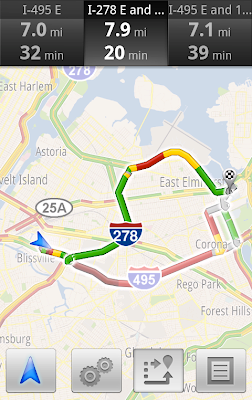
You don’t have to do anything to be routed around traffic; just start Navigation like you normally would, either from the Navigation app or from within Google Maps. Before today, Navigation would choose whichever route was fastest, without taking current traffic conditions into account. It would also generate additional alternate directions, such as the shortest route or one that uses highways instead of side roads. Starting today, our routing algorithms will also apply our knowledge of current and historical traffic to select the fastest route from those alternates. That means that Navigation will automatically guide you along the best route given the current traffic conditions.
Not only can you save time and fuel, you’re making traffic better for everyone else by avoiding traffic jams. Keep in mind that we can’t guarantee that Navigation will be able to find a faster way, but it will always try to get you where you’re going as fast as possible.
You can begin routing around traffic with Google Maps Navigation for Android in North America and Europe where both Navigation and real-time traffic data are available.
Enjoy your newly found free time!
Ever been stuck in traffic, only to find out you’d have been better off going a bit out of your way to take a less congested route? If you’re like me, you probably hear the traffic report telling you what you already know: traffic is bad on the road you’re currently on, and you should have taken another. It doesn’t need to be this way, and we want to help. So we’re happy to announce that Google Maps Navigation (Beta) will now automatically route you around traffic. With more than 35 million miles driven by Navigation users every day, this should add up to quite a bit of time saved!
On a recent trip to New York, I was running late to meet some friends at the Queens Museum of Art. I had no idea that there was a traffic jam along the route I would normally have taken. Thankfully, Navigation routed me around traffic. I didn’t even have to know that there was a traffic jam on I-495, and I got to enjoy a much faster trip on I-278 instead.

Navigation now uses real-time traffic conditions to automatically route you around traffic.
You don’t have to do anything to be routed around traffic; just start Navigation like you normally would, either from the Navigation app or from within Google Maps. Before today, Navigation would choose whichever route was fastest, without taking current traffic conditions into account. It would also generate additional alternate directions, such as the shortest route or one that uses highways instead of side roads. Starting today, our routing algorithms will also apply our knowledge of current and historical traffic to select the fastest route from those alternates. That means that Navigation will automatically guide you along the best route given the current traffic conditions.
Not only can you save time and fuel, you’re making traffic better for everyone else by avoiding traffic jams. Keep in mind that we can’t guarantee that Navigation will be able to find a faster way, but it will always try to get you where you’re going as fast as possible.
You can begin routing around traffic with Google Maps Navigation for Android in North America and Europe where both Navigation and real-time traffic data are available.
Enjoy your newly found free time!
Happy birthday Will Eisner
From time to time we invite guests to post about topics of interest and we’re pleased to have Scott McCloud join us here. Scott is a comics artist with special ties to Google—he illustrated the Chrome comic book and is a 2011 U.S. Doodle 4 Google judge. He also helped in the design of today’s doodle in honor of Will Eisner, which is running in many countries including the U.S. In this post, Scott shares his thoughts on Will Eisner’s legacy. -Ed.
Will Eisner, American comics pioneer and creator of The Spirit, was born on March 6, 1917. He would have been 94 today.
Many of us who knew him still find it hard to believe he’s gone. He died in 2005, but for six decades, Eisner was a participant in, and inspiration for, much of the best in American comics, as well as a friend and mentor to multiple generations of comics artists.
Eisner influenced comics in dozens of ways. In the ‘40s, Eisner’s The Spirit—a seven-page newspaper feature—introduced an arsenal of visual storytelling techniques still used generations later, and provided an early testing ground for future comics stars including Jack Kirby and Jules Feiffer. (The Spirit also began a tradition of pictorially-integrated logos—inspiring today's snazzy rooftop doodle!)
Eisner was one of the first cartoonists to understand the power of visual education, and wrote eloquently about the process of making comics in Comics and Sequential Art (1985) and Graphic Storytelling (1996). As early as 1941, he publicly advocated treating comics as a distinct literary and artistic form, and—nearly four decades later—was instrumental in the rise of the graphic novel in America, beginning with A Contract with God in 1978.
For most of his career, Eisner was years, even decades, ahead of the curve. I saw him debating artists and editors half his age, and there was rarely any question who the youngest man in the room was. It helped that he never stood on ceremony. Everyone was his peer, regardless of age or status. None of us called him “Mr. Eisner.” He was just “Will.”
Eisner lived well into his eighties; long enough to see an industry award named after him. Inevitably, the prospect loomed that Will Eisner himself might win an “Eisner Award” leading to some awkward choices; Hall of Fame, maybe? Lifetime Achievement?
His only suggestion was “Most Promising Young Cartoonist.”
And so he was.
Will Eisner, American comics pioneer and creator of The Spirit, was born on March 6, 1917. He would have been 94 today.
Many of us who knew him still find it hard to believe he’s gone. He died in 2005, but for six decades, Eisner was a participant in, and inspiration for, much of the best in American comics, as well as a friend and mentor to multiple generations of comics artists.
Eisner influenced comics in dozens of ways. In the ‘40s, Eisner’s The Spirit—a seven-page newspaper feature—introduced an arsenal of visual storytelling techniques still used generations later, and provided an early testing ground for future comics stars including Jack Kirby and Jules Feiffer. (The Spirit also began a tradition of pictorially-integrated logos—inspiring today's snazzy rooftop doodle!)
Eisner was one of the first cartoonists to understand the power of visual education, and wrote eloquently about the process of making comics in Comics and Sequential Art (1985) and Graphic Storytelling (1996). As early as 1941, he publicly advocated treating comics as a distinct literary and artistic form, and—nearly four decades later—was instrumental in the rise of the graphic novel in America, beginning with A Contract with God in 1978.
For most of his career, Eisner was years, even decades, ahead of the curve. I saw him debating artists and editors half his age, and there was rarely any question who the youngest man in the room was. It helped that he never stood on ceremony. Everyone was his peer, regardless of age or status. None of us called him “Mr. Eisner.” He was just “Will.”
Eisner lived well into his eighties; long enough to see an industry award named after him. Inevitably, the prospect loomed that Will Eisner himself might win an “Eisner Award” leading to some awkward choices; Hall of Fame, maybe? Lifetime Achievement?
His only suggestion was “Most Promising Young Cartoonist.”
And so he was.
YouTube Highlights 3/3/2011
This is the latest in our series of YouTube highlights. Every couple of weeks, we bring you regular updates on new product features, interesting programs to watch, and tips you can use to grow your audience on YouTube. Just look for the label “YouTube Highlights” and subscribe to the series. – Ed.
In past weeks, we’ve featured two more YouTube interviews with leaders through the World View program and seen more footage come in from across the Middle East as unrest there continues.
David Cameron and John Boehner on YouTube
In YouTube World View’s second interview, YouTube and Al Jazeera English sat down with British Prime Minister David Cameron. Ten thousand people submitted questions, and in the interview, the Prime Minister shared his thoughts on what should be done in Libya, and talked about increased taxes for banks in the U.K. and Britain’s role in Afghanistan.
And as the budget debate rages on the U.S. Capitol Hill, we asked viewers from across the U.S. and around the world to submit questions to Speaker of the House John Boehner (R-OH). The final interview will be posted to YouTube on Friday, March 4.
We’ll have another interview in the coming weeks—check YouTube World View for more details soon.
Join us on YouTube for Carnaval in Brazil
An estimated 100 million people travel to Brazil each year to experience Carnaval, the iconic celebration on the streets of Salvador, Bahia. This year, you can join the festivities on the Carnaval YouTube channel via computer or mobile phone. Watch live feeds of Salvador’s multi-day street fest from Thursday, March 3 through Tuesday, March 8. If you’re lucky enough to be there in person, find out how to buy a pass to Google’s street-side camarote (cabin) at the celebration at www.youtube.com/carnaval.
February’s “On The Rise” winner
After tens of thousands of votes, D-trix from theDOMINICshow has been named February’s “On The Rise” contest winner. He beat out tornado chasers, graphic artists and pop stars for the honor. When D-trix isn’t spoofing Justin Bieber, he’s dancing or teaching people how to rap. Congratulations!
Making YouTube seven times faster
To help you better enjoy all the great content that’s uploaded to YouTube every minute, we recently increased speed for uploads and playback. Google’s cloud computing capabilities help us process videos in chunks on different machines—making our video-processing seven times faster than in 2008.
Ad Blitz winner
Super Bowl ads are always a big draw of the game. This year, we added Super Bowl spots to the Ad Blitz gallery so you could vote for your favorites. More than 2.7 million votes were cast, and 3.5 million views took place on mobile devices. This year’s winner, Chrysler, was featured on the YouTube masthead for the Saturday following the game.
This week’s trends on YouTube
Here are a few recent highlights from YouTube Trends:
We’ll have another update for you in a couple of weeks. Until then, visit us at the YouTube Blog.
In past weeks, we’ve featured two more YouTube interviews with leaders through the World View program and seen more footage come in from across the Middle East as unrest there continues.
David Cameron and John Boehner on YouTube
In YouTube World View’s second interview, YouTube and Al Jazeera English sat down with British Prime Minister David Cameron. Ten thousand people submitted questions, and in the interview, the Prime Minister shared his thoughts on what should be done in Libya, and talked about increased taxes for banks in the U.K. and Britain’s role in Afghanistan.
And as the budget debate rages on the U.S. Capitol Hill, we asked viewers from across the U.S. and around the world to submit questions to Speaker of the House John Boehner (R-OH). The final interview will be posted to YouTube on Friday, March 4.
We’ll have another interview in the coming weeks—check YouTube World View for more details soon.
Join us on YouTube for Carnaval in Brazil
An estimated 100 million people travel to Brazil each year to experience Carnaval, the iconic celebration on the streets of Salvador, Bahia. This year, you can join the festivities on the Carnaval YouTube channel via computer or mobile phone. Watch live feeds of Salvador’s multi-day street fest from Thursday, March 3 through Tuesday, March 8. If you’re lucky enough to be there in person, find out how to buy a pass to Google’s street-side camarote (cabin) at the celebration at www.youtube.com/carnaval.
February’s “On The Rise” winner
After tens of thousands of votes, D-trix from theDOMINICshow has been named February’s “On The Rise” contest winner. He beat out tornado chasers, graphic artists and pop stars for the honor. When D-trix isn’t spoofing Justin Bieber, he’s dancing or teaching people how to rap. Congratulations!
Making YouTube seven times faster
To help you better enjoy all the great content that’s uploaded to YouTube every minute, we recently increased speed for uploads and playback. Google’s cloud computing capabilities help us process videos in chunks on different machines—making our video-processing seven times faster than in 2008.
Ad Blitz winner
Super Bowl ads are always a big draw of the game. This year, we added Super Bowl spots to the Ad Blitz gallery so you could vote for your favorites. More than 2.7 million votes were cast, and 3.5 million views took place on mobile devices. This year’s winner, Chrysler, was featured on the YouTube masthead for the Saturday following the game.
This week’s trends on YouTube
Here are a few recent highlights from YouTube Trends:
- Britney Spears built up anticipation for her latest music video.
- Dramatic footage poured in from across the Middle East: Libya, Iran, Algeria and Yemen.
- A funny moment from "Family Feud" got "passed around."
We’ll have another update for you in a couple of weeks. Until then, visit us at the YouTube Blog.
Subscribe to:
Posts (Atom)